
The Atomic SIG has just released v13 of atomic-ci, and it’s the biggest change to our build tooling in quite some time. When we started the Atomic SIG last year, we built our images with the best tools available at the time. Since then, the bootc community has learned a lot from those tools and built better ones. This release moves us onto them, aligning with the rest of the bootc community. Most of that is plumbing you’ll never see, but some of it you will, like ISOs that boot into a live session, and ISOs for aarch64.
What the Atomic SIG does
AlmaLinux has offered bootc images since 2024. They’re operating systems delivered as container images, so the whole system updates in one step and you can roll back if something goes wrong. The Atomic SIG maintains four projects:
- Atomic Desktop: AlmaLinux 10 bootc images with GNOME, KDE Plasma, or COSMIC, plus installer ISOs.
- Atomic Workstation: the GNOME Atomic Desktop image with extra tools and configuration, ready to use as a daily workstation.
- atomic-respin-template: a template repository for building your own Atomic AlmaLinux respin on top of those images. Atomic Workstation is built from it too.
- atomic-ci: the reusable GitHub Actions workflows that build, sign, and publish all of it, for our images and for every respin made from the template.
What changed
Rechunking with bootc-base-imagectl. An image built from a Containerfile ends up with layers that reflect how it was built, not what’s in it. Rechunking takes the finished image and splits it into layers by package, so an update only downloads the parts that actually changed. We used to do this with hhd-dev/rechunk, the community’s go-to tool at the time, and it served us well. We now use bootc-base-imagectl rechunk, which is the recommended way to rechunk today. It also ships in the AlmaLinux bootc base image itself, so there’s no extra tool to pull in.
ISOs built with image-builder. We used to build ISOs with bootc-image-builder. They’re now built with image-builder, which is what the community recommends for bootc ISOs today, and they boot into a live session of the image. You can try the desktop on your own hardware first, then run the installer from there. The image is on the ISO, so installing doesn’t need a network connection, and the live session has a partitioning tool in case you need to prepare your disks first.
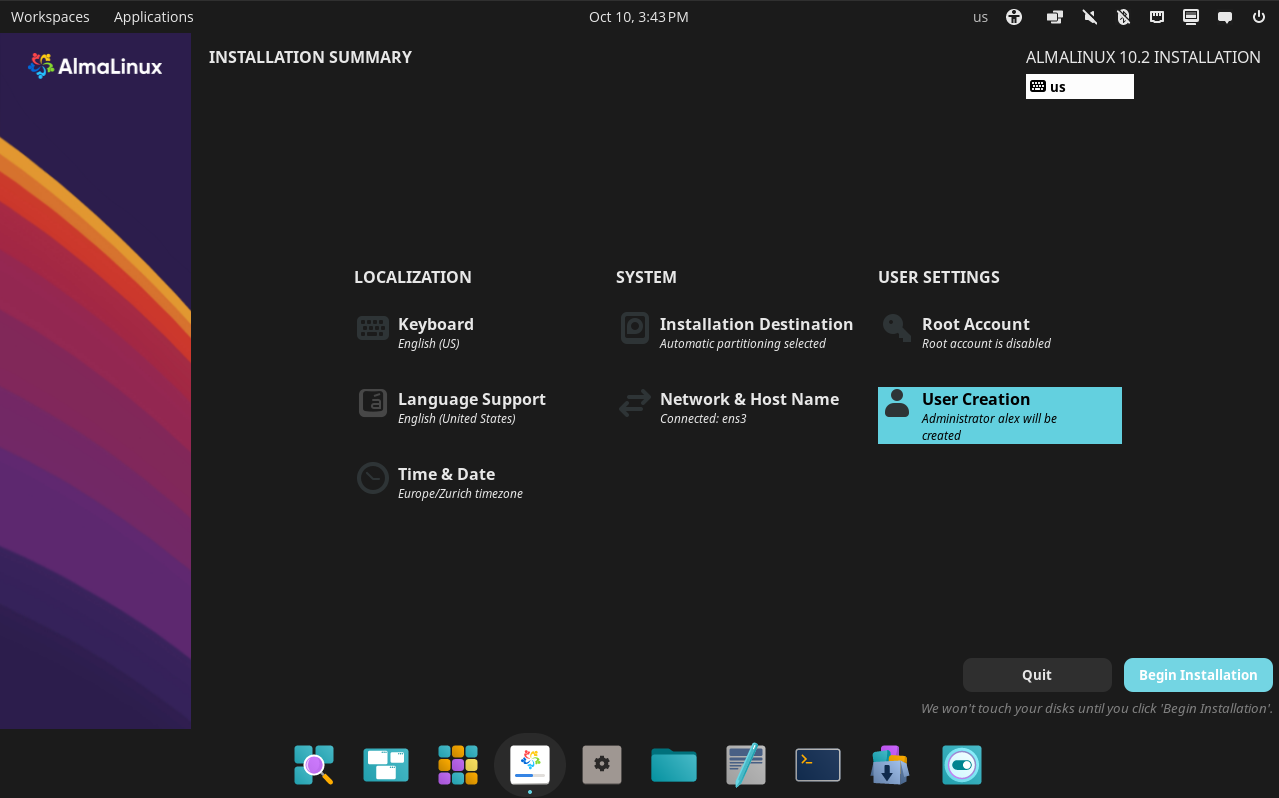
COSMIC Desktop Live ISO image installer
aarch64 ISOs. We’ve published aarch64 images for a while. Now there are ISOs for them too.
Smaller things. Images built from branches are signed too (pull requests still aren’t until they’re merged), builds run on Ubuntu 26.04, a failed ISO build uploads its logs so it’s easier to debug, and a new hook-script input lets respins customize the live environment and the installer. The changelog has the full list.
If you run Atomic Desktop or Atomic Workstation
You don’t need to do anything. The first update after this change downloads the whole image again, because its layers are now arranged differently. After that, updates go back to downloading only what changed.
If you maintain a respin
Your current workflows keep working on v11 for now, but some of v11’s jobs run on ubuntu-latest, which GitHub is switching to Ubuntu 26.04 by November 19, 2026. v11 hasn’t been tested there, so upgrade soon!
v13 has breaking changes, and your workflows will stop working until you update them. Dependabot will open a pull request to bump atomic-ci, but make the changes from the upgrade guide in that same pull request before you merge it, or your builds will break.
Most of the changes are in the job that builds the ISO: a few inputs are renamed or removed, and iso.toml goes away because the installer now sets up updates by itself. If you added your own steps to the installer’s kickstart, they move to a hook-script. While you’re there, also update cleanup.sh and the Makefile from the template, and add arm64 to the ISO platforms if you’d like aarch64 ISOs.
If you’re starting a new respin, the template already has all of this.
What’s next
This release was about catching up with where bootc is today, and the tooling keeps evolving.
For rechunking, we’ll probably move to chunkah eventually. It’s a generalized successor to the rpm-ostree code that bootc-base-imagectl rechunk uses today, and since it isn’t tied to RPMs or bootable images, it’s likely where the wider community ends up. bootc-base-imagectl rechunk can already use it with --chunkah, so it should be a small step when we get there, but we’ll have to figure out if we can do it without breaking updates.
The bigger step is bootc’s composefs backend. bootc currently stores the system with ostree. With composefs, fs-verity checks that the operating system files on disk are exactly the ones in the image, and that check can eventually be chained all the way back to Secure Boot.
We’re not switching yet. Right now there’s no way to move an existing installation from ostree to composefs without reinstalling, and we don’t want to ask anyone to reinstall. Once composefs is fully supported and the upgrade is transparent for people already running our images, we’ll make the move. In the meantime, we could publish a separate series of composefs images for people who want to try it early. Would you use that? Tell us in ~SIG/Atomic!
Get involved
If something breaks after you upgrade, or you have ideas for where this should go next, come find us in ~SIG/Atomic or open an issue on atomic-ci. The SIG works asynchronously in chat, and the wiki page has everything else you need to get started. Come join us!